
















Earn 5 Maharaja Points per Rs. 100 spent
Fly Further Stay Better


*Terms and Conditions apply.
All stay bookings are made on and managed by Booking.com. Air India acts solely as a redirection platform and does not manage or control hotel bookings, policies, or services.
Why Choose Booking.com on Air India
Experience travel that’s rewarding when you fly Air India and book your stay through Booking.com

Exclusive Deals
Unlock special rates and tailored deals when you book your flight with Air India and your accommodation through Booking.com

Curated Stays
Find the best matches for your destination and duration. Choose from stays that are handpicked for convenience, quality, and location

One Effortless Journey
Two trusted partners, for flights and stays that are managed together for less hassle and more ease
Explore our stays
Up to 10% off selected stays
Booking period: 10 Aug - 10 Sep
Stay period: 10 Aug - 30 Sep


























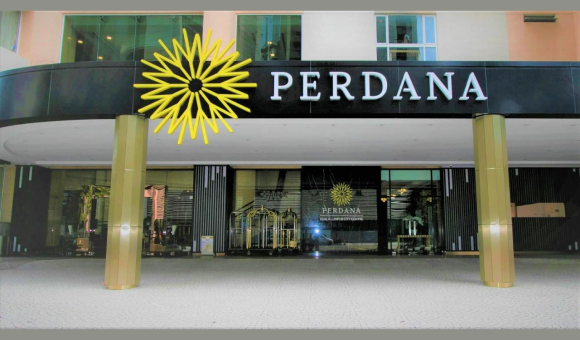





























Terms and Conditions
Customer Terms & Conditions – Hotels with Booking.com on Air India
These Terms govern your use of the “Hotels” option on Air India’s website and mobile app, powered by Booking.com.
1. Relationship and Scope
1.1 By selecting the “Hotels” option on Air India channels, you acknowledge that you are entering a Booking.com–powered hotel booking experience.
1.2 All hotel reservations are facilitated, processed, and fulfilled by Booking.com (or its group companies) and the respective accommodation provider.
1.3 Air India is not an agent or an intermediary of Booking.com. Air India is not a party to your hotel booking contract and does not provide accommodation services.
2. Applicable Terms for bookings
2.1 Your hotel booking is governed by:
- Booking.com’s Terms & Conditions and Privacy/ Cookie notices; and
- The selected accommodation provider’s policies (cancellation, deposits, taxes, property rules, etc.)
2.2 Air India may provide generic information about the hotel booking process. However, these Booking.com and hotel terms and policies supersede any information appearing on Air India digital channels. Air India’s website and app terms shall continue to apply to the use of Air India digital channels, to the extent they do not conflict with the reservation-specific terms.
3. Role and Liability of Air India
3.1 Air India’s role is limited to providing a referral link and promoting hotel availability from Booking.com.
3.2 Air India is not responsible for:
- Hotel availability, images, descriptions, facilities, or pricing;
- Acceptance, modification, cancellation, or fulfilment of bookings;
- Hotel quality, staff conduct, or service levels; or
- Any dispute, refund, charge, or compensation relating to your stay.
3.3 Air India does not make any warranty regarding hotel content displayed on Air India’s website or mobile app (which are provided by Booking.com or the concerned hotel). Air India disclaims liability for any loss or issues arising from hotel bookings, including delays, property issues, overbookings, or billing disputes.
4. Payments and Invoices
4.1 Payments for hotel bookings are processed by Booking.com, a Booking.com group company, or the hotel, as specified during booking.
4.2 Air India is not the merchant of record and does not issue invoices for hotel stays. Invoices must be obtained directly from Booking.com and/or the property.
4.3 Booking.com’s Terms & Conditions apply to all hotel transactions.
5. Changes, Cancellations & No‑Shows
5.1 All modifications or cancellations must be made directly with Booking.com through its website/app or customer service.
5.2 Refund eligibility, fees, and no‑show charges are determined solely by the hotel and Booking.com policies accepted during booking.
5.3 Air India cannot alter, waive, cancel, or override Booking.com or hotel rules.
6. Customer Support
6.1 All support requests relating to hotel bookings—payment issues, property concerns, booking errors, room allocation, overbooking, service levels—must be directed to Booking.com Customer Service.
6.2 Air India customer service cannot view, modify, cancel, or refund hotel reservations.
6.3 Air India does not make any warranties or representations about the quality, merchantability, suitability, or availability of services offered by Booking.com. You acknowledge that Air India does not endorse, control, or guarantee the quality or fitness of any such products/services.
6.4 Any dispute in relation to delivery, suitability, merchantability, availability, fitness, or quality of the products/services availed under the offer must be referred by the customer directly to Booking.com.
7. Data Protection
7.1 Personal data provided during hotel booking is collected and processed by Booking.com under its Privacy Policy.
7.2 Air India may receive limited aggregated or anonymized reporting for analytical purposes, without access to full booking or payment details.
8. Changes to this Notice
8.1 Air India may amend these Terms at any time. The latest version will be available on the Air India “Hotels” page.
9. Maharaja Club Points – Earning Terms
9.1 Eligibility
Maharaja Club members can earn Points for eligible hotel stays booked via the Air India Hotels page when a valid membership number is entered at the time of booking.
9.2 Updating Membership Details
- A Maharaja Club member must provide their valid Maharaja Club ID at the time of booking to earn Maharaja Points.
- Only a Maharaja Club member with a valid 09-digit numeric Maharaja Club ID is eligible for the Maharaja Club partnership offer.
In case a Maharaja Club ID is not mentioned, or an invalid Maharaja Club ID is entered at the time of booking, no reward points will be awarded and the member cannot retroactively claim Maharaja Points for their stay.
9.3 Booking Channel Requirement
Points are earned only on bookings made via the dedicated Air India Hotels page.
Any booking made on the Booking.com direct website/app, or any third-party booking sources (such as travel agents, online travel agents, aggregator websites, etc.) are not eligible to earn Maharaja Points.
9.4 Earning Rate
- On completing a stay on any of the hotels offered by Booking.com, Maharaja Club Members earn 5 Maharaja Club Points per 100 spent, inclusive of taxes.
- Currency conversion values are dynamic and determined by Booking.com.
- The points displayed during booking are indicative; final credit may vary due to exchange rates or booking changes.
- Points may be reduced for non‑eligible taxes, service fees, or additional charges.
9.5 Non‑Refundable & No‑Show Bookings
If you cancel a non‑refundable reservation or fail to check in, charges apply as per hotel policy, and no Points will be awarded.
9.6 Credit of Points
- Eligible Maharaja Points earned will be credited to the Maharaja Club account within 60-90 days after the completion of the stay. In the event of a cancelled booking, the points will not be awarded.
- Points can be earned per Maharaja Club membership ID basis. In case the customer books 02 rooms with 02 different IDs, points will be awarded per membership ID.
- These Points will solely be governed by Maharaja Club terms in place at the relevant time of credit.
9.7 Data Consent for Points Credit
By booking via the Air India Hotels page, members authorize Air India to share limited profile data (FFP IDs – 09 digit Maharaja Club ID) with Booking.com solely for Points processing, solely for validating eligibility and crediting Maharaja Club Points.
9.8 Pricing & Points
Hotel prices and the corresponding Points displayed are dynamic and may change.
Rates and Points shown at the time of booking are accurate.
9.9 Hotel Loyalty Programme Exclusions
Hotel loyalty programme privileges, tier status, or points do not apply to bookings made via the Air India Hotels page.
10. Other Terms
10.1 All promotional conditions must be met at the time of booking; no retroactive claims will be permitted.
10.2 This partnership offer cannot be used in conjunction with any other offer(s).
10.3 The offer is subject to Booking.com’s General Terms & Conditions and these Air India Terms.
10.4 Booking.com may modify or withdraw the offer at any time in accordance with applicable law.
10.5 Air India reserves the right to modify, discontinue or terminate this arrangement, at any point without prior notice and shall not be liable to any Maharaja Club member or any person for any such modification, discontinuation, or termination. Air India will in no event be liable for any direct, indirect, special, incidental, or consequential loss/damages, bodily injury or death arising out of this offer or purchase, use or non-use of any products/services under this offer.
10.7 These terms and conditions are in addition to and not in derogation to the terms and conditions as applicable to Maharaja Club members specified on our website www.airindia.com, whose terms and conditions will also be applicable to this offer.
10.8 This offer shall be governed by the laws of India. Any dispute arising out of or in connection with this offer shall be subject to the exclusive jurisdiction of the courts of Delhi.
10.9 By availing this offer, the customers shall be deemed to have accepted all the aforesaid terms and conditions.
11. Customer Service – Booking.com Contact Numbers
For all queries related to your hotel reservation, contact Booking.com:
Online: https://www.booking.com/content/contact-us.html
Phone Support:
- India (Hindi): +91 22 3314 3993
- International (English): +44 203 320 2609
- Singapore (English): +65 6415 5410
- Malaysia (English): 03‑7724‑4265
- Malaysia (Malay): 03‑7724‑4262
- Malaysia (Mandarin): 03‑7724‑4264
- Philippines (English): 1800 111 42126
- Indonesia (Bahasa Indonesia): 0078030110118
- Taiwan (Mandarin): 02 8793 3062
- Thailand (Thai): +66 2787 3013
- Hong Kong (English): 5077 5530
- Hong Kong (Cantonese): 3077 5532
- Hong Kong (Mandarin): 3077 5531
FAQs
FAQ Content for Customers (Air India Hotels with Booking.com)
1. Who am I booking my hotel with?
When you book a hotel through the Air India “Hotels” page, your hotel reservation is made on Booking.com and is subject to Booking.com’s Terms and Conditions and the individual property’s policies. Air India only provides a link to Booking.com and is not a party to your accommodation contract.
2. Who provides customer support for my hotel booking?
All hotel related customer support (new bookings, changes, cancellations, payments, refunds, special requests, complaints) is provided by Booking.com and/or the hotel.
3. How do I make a hotel booking?
Select “Hotels” on Air India’s website or app; you will be taken to the Booking.com powered hotel page where you can search, compare, and complete your reservation directly with Booking.com.
4. How will I receive my confirmation?
After completing your booking on Booking.com, you will receive a confirmation email from Booking.com with your hotel details, policies, and reference number.
5. Can I earn any loyalty benefits on hotel bookings?
If you are a Maharaja Club Member, you can earn points by adding your membership number in booking flow.
6. Who charges my card for the hotel booking?
Depending on the rate and property, your card may be charged by Booking.com, a Booking.com group company, or directly by the hotel, as indicated during the booking process and in your confirmation.
7. Where can I get a GST/tax invoice for my hotel stay?
Invoices for the hotel stay are issued by Booking.com and/or the hotel, as the merchant of record, and not by Air India. Please use the link in your Booking.com confirmation or contact the property/Booking.com support to request an invoice.
8. What about additional charges (resort fee, city tax, deposits)?
Any additional charges such as city taxes, resort fees, deposits, or extras are governed by the property’s policies displayed on Booking.com at the time of booking.
9. How do I change or cancel my hotel booking?
To change or cancel, click the link in your Booking.com confirmation email or manage your booking via the Booking.com app or website, subject to the hotel’s cancellation and modification policies.
10. Will I be charged if I cancel?
Charges for cancellations or no shows depend on the hotel’s policy you accepted during booking (e.g., non-refundable, free cancellation until a specific time). These details are shown on Booking.com and in your booking confirmation.
11. My card was charged even though I did not stay / I was marked as no show. What can I do?
Please contact Booking.com Customer Service using your reservation number so they can review your case with the hotel and advise on any possible refund.
12. How can I request early check in, late check out, or special room preferences?
Use the “Message the property” option within your Booking.com reservation or contact Booking.com Customer Service, fulfilment of any request depends on the hotel’s availability and policy.
13. What if I face an issue at the hotel (overbooking, room quality, service)?
Raise the issue immediately at the property and then contact Booking.com through your reservation page or Customer Service so they can assist and record your complaint.
14. Is Air India responsible if something goes wrong with my hotel booking?
Air India is not responsible for the provision of accommodation services, charges, refunds, or any issues arising from your hotel stay. Your contractual relationship is with Booking.com and the hotel.
15. How is my data used for hotel bookings?
Your hotel booking data is collected and processed by Booking.com in accordance with its Privacy and Cookie Statement available on the Booking.com website and during the booking flow.